

KineticEQ
Phase Smearing. Harmonic Folding. Physical Resonance. One Masterpiece.
Currently exclusive to Windows systems (additional OS support in development).
What is it?
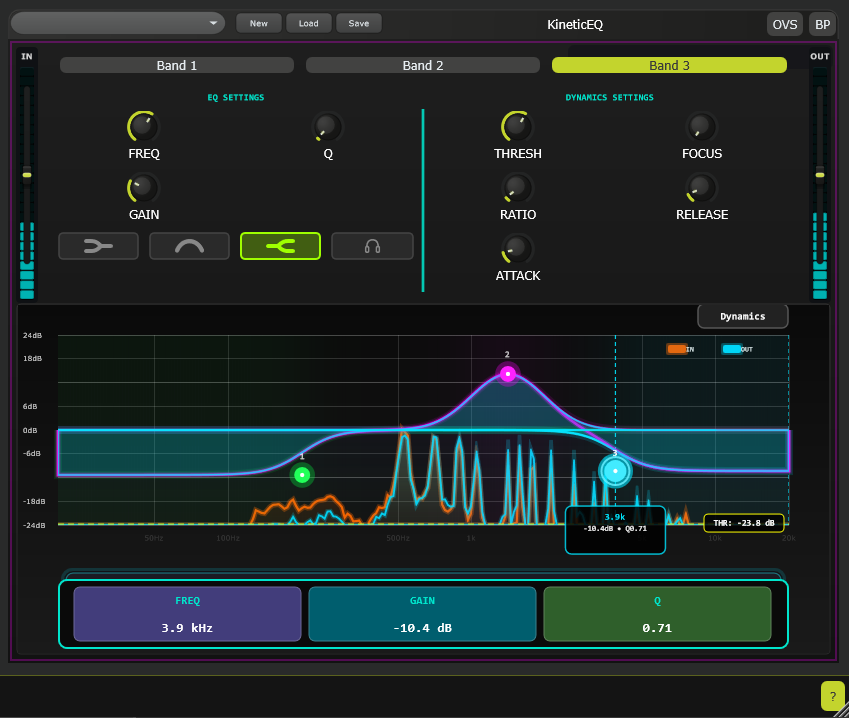
KineticEQ is a three-band dynamic equalizer that introduces a new dimension to spectral processing: Temporal Focus. While traditional dynamic EQs react strictly to volume (amplitude), KineticEQ reacts to the movement of the sound.
At its core is the proprietary Kinetic Focus engine. This allows you to continuously blend the sidechain detection circuit between a Transient Envelope (reacting to drum hits, pick attacks, and consonants) and a Body Envelope (reacting to sustain, resonance, and tails).
Whether you need to compress only the stick impact of a snare at 2 kHz while leaving the ring untouched, or expand the breathiness of a vocal without bringing up the sibilance, KineticEQ separates the impact from the tone.
Key Features
-
1
The "Kinetic Focus" Engine
Most compressors force you to choose between a fast attack (to catch peaks) or a slow attack (to preserve punch). KineticEQ uses a dual-envelope detection topology.
- 0% Focus (Sustain): The band reacts to the average RMS body of the signal.
- 100% Focus (Transient): The band reacts exclusively to fast, high-frequency amplitude spikes.
- The Blend: By sweeping the Focus control, you crossfade between these two detection circuits in real time, allowing precise targeting of specific envelope characteristics within a frequency band.
-
2
High-Definition Oversampling
Fast compression on high frequencies often creates digital aliasing and inharmonic distortion. KineticEQ runs on an Oversampled Core, defaulting to 4x in real-time processing and 8x during offline rendering. This ensures that even when aggressively clamping down on high-frequency transients with fast attack times, the result remains smooth, analog-like, and free of digital harshness.
Audio Demos
Specifications
FAQ
Q:How is Focus different from just
changing the Attack time?
+
Attack time dictates how quickly a compressor reacts once it detects a signal. Focus determines what the detector considers a signal in the first place.
- With a fast attack on a standard compressor, the processor catches the transient but also immediately affects the sustain that follows.
- With KineticEQ set to 100% Focus, the detector effectively ignores the sustain. It detects the transient, applies gain reduction, and then releases the sustain even if it remains loud. This allows you to EQ the click of a kick drum independently from the boom of the same kick drum.
Q:Can I use KineticEQ as a static EQ?
+
Yes. If you leave the Threshold set to 0 dB (or the Range set to 0 dB), the dynamic section is effectively bypassed. In this state, KineticEQ functions as a pristine three-band equalizer running at 4x oversampling. The visualizer displays the static EQ curve without any dynamic overlay.