
Analog Memory
Phase Smearing. Harmonic Folding. Physical Resonance. One Masterpiece.
Currently exclusive to Windows systems (additional OS support in development).
What is it?
Analog Memory is a time-machine for your audio, designed to emulate the beautiful imperfections of vintage digital samplers and worn-out media. It is not just a bitcrusher; it is a Signal Aging Processor.
It reconstructs the signal path of early 80s hardware, simulating the entire lifecycle of a sampled sound: from the grit of the input converters (Bit Depth) to the clock instability of the playback engine (Jitter) and the physical decay of the storage medium (Wear).
Whether you want the crunchy texture of a 12-bit drum machine or the ghostly flutter of a dying cassette, Analog Memory delivers the warmth of obsolescence.
Key Features
-
1
The "Memory Core" Architecture
The heart of the module is a variable-resolution buffer that degrades audio in real-time. Unlike standard downsamplers that just remove treble, Analog Memory implements Variable Sample Rate Interpolation. This allows you to smoothly sweep the "Rate" knob to create the classic "pitch-down" aliasing artifacts found on vintage samplers when pitching samples down, adding a metallic, ringing character that cuts through a mix.
-
2
"Wear" & "Jitter" Instability
Digital doesn't have to be static.
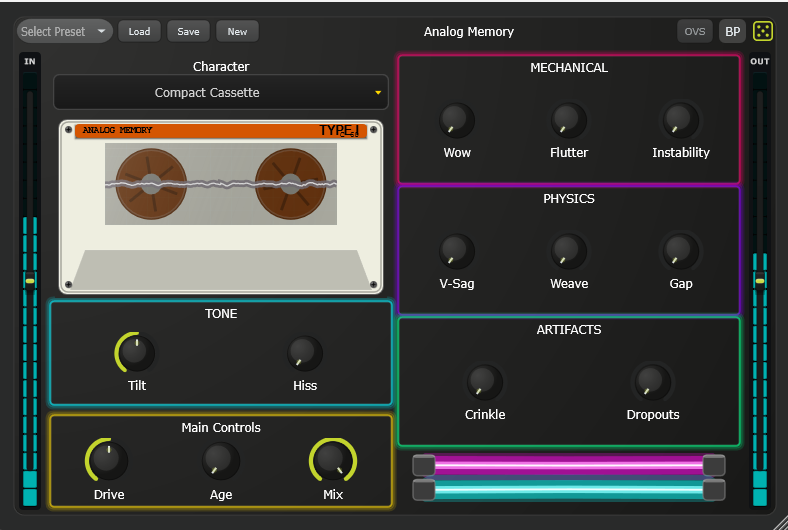
- Jitter: Introduces micro-timing errors into the playback clock. This simulates the unstable clock crystals of old hardware, creating a subtle "haze" or phase diffusion that softens harsh transients.
- Wear: Simulates physical media degradation (like dropout on a tape or oxide loss). It introduces randomized amplitude fluctuations and spectral dropouts, making the audio feel fragile and aged.
-
3
Bit-Crushing with "Crunch"
The Depth control reduces the dynamic resolution of the audio (Bit Reduction). However, Analog Memory adds a proprietary "Crunch" circuit before the bit-reduction stage. This pre-distorts the signal, enriching the harmonics before they get quantized. The result is a louder, more aggressive lo-fi texture that avoids the thin, sputtering sound of cheap bitcrushers.
-
4
Filter & Tilt Tone Shaping
To tame the harsh digital artifacts, the module includes a dedicated Post-Filter section. It features a resonant Low-Pass filter to roll off the "shatter" of aliasing, coupled with a Tilt EQ that balances the overall brightness. This allows you to make a sound "lo-fi" but still keep it warm and seated in the mix.
-
5
"Artifact" Noise Generator
Silence is boring. Analog Memory includes a background Noise generator that isn't just white noise; it generates digital "grit" and hiss that correlates with the signal amplitude. This adds a layer of "air" and texture that glues the processed sound together, mimicking the noise floor of vintage A/D converters.
Audio Demos
Specifications
FAQ
Q:What is the difference between
"Rate" and "Jitter"?
+
Rate controls the average sample rate of the virtual converter (e.g., lowering it from 44.1kHz to 11kHz), which introduces constant aliasing "ringing" tones. Jitter introduces randomness to that rate. Turning up Jitter makes the aliasing pitch wobble and blur, turning a steady metallic ring into a cloudy, noisy texture.
Q:Why does the "Crunch" knob make it
louder?
+
The Crunch parameter drives the input into a saturation circuit before the digital degradation stage. By compressing and distorting the waveform first, it ensures that more details are captured by the low-bit-depth quantizer. This mimics the technique of "driving the inputs hot" on old samplers to get a punchier sound despite the low fidelity.
Q:Does "Wear" simulate tape hiss?
+
No, the Noise knob handles the hiss. The Wear knob simulates the instability of the playback mechanism. Think of it as a loose cable or a dirty tape head—it creates random volume drops and subtle spectral instability that makes the audio feel like it's struggling to play back correctly.